
Discover TÜV-certified GoogleTest with Agentic AI for C/C++ testing!
Get the Details »


Whitepaper
Before you jump in, get a preview below.
Software verification and validation efforts depend on functional safety objectives, business risk levels, and organizational quality culture. Producing safe, secure, high-quality software requires more than determination—it demands solid knowledge and the right combination of testing techniques and tools.
This paper explains how development teams can improve quality assurance by combining automated testing techniques including:
The concepts discussed apply to any programming language, with examples from C/C++ development using Parasoft C/C++test.
When thinking about possible high-level software malfunctions, several classes of software errors can be distinguished:
The first two classes fall into requirements management. This paper focuses on the third category, which embraces a wide range of potential software problems.
What does "a requirement has been coded incorrectly" mean? It can be several things.
Consider a software module expected to process two thousand samples per second.
No single technology effectively eradicates all error types. Uninitialized memory can be detected by pattern-based static analysis, while detecting buffer overflow requires advanced, flow-based static analysis or runtime memory monitoring. Code that never executes can be identified through code coverage analysis. Low-level requirements must have corresponding unit tests, including performance checks and traceability links to the requirements they verify and validate.
Not all software projects need all available testing technologies, and organizations face the dilemma of how to balance budget and quality. Projects related to functional safety will most likely select all available technologies to ensure uncompromised quality and compliance with software safety standards, such as ISO 26262, DO-178C, or IEC 62304.
Teams commonly choose static analysis, unit testing, integration testing, system testing, and code coverage, as they seem to cover a significant portion of software defects. In any case, teams that design quality assurance processes must be aware of the landscape and understand the consequences of selecting a particular subset of available testing technologies.
Unwillingness to implement a wide range of testing technologies often stems from a concern that using multiple techniques imposes significant overhead on the pace of development and impacts the budget.
The cost of multiple separate tools, the learning curve, and the necessity to switch between different use models and interfaces can be problematic. As a result, developers will try to avoid using tools and automation, as it redirects their attention from writing code to tool usage, decreasing their productivity.

It’s important to specify the expectations of a unified testing tool before discussing its value. The tool should:
Unified testing helps avoid a number of problems, including:
As mentioned in the introduction, software defects fall into different categories, so it cannot be expected that all of them are identified by one testing technique. To provide a more concrete example, observe the following code snippet:
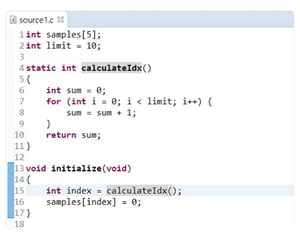
Example source code.
These few lines of code contain several issues. Specifically, in line 13 the developer is trying to initialize a global buffer using the index value computed in the calculateIdx() function, but they fail to validate whether it is within the allowed range. Even if dozens of manual testing sessions are run, they may not reveal this issue, as writing an integer value to a random memory location rarely produces spectacular effect immediately.
But one day, most likely after the release, the memory layout may change, and the operation from line 13 will crash the application. Interestingly, static analysis may also fail to flag this problem because of the loop that is used to compute the index.
In contrast, a memory monitoring tool, which instruments source code by injecting special checks and reports improper memory operations, detects software problems only on paths that were executed. This approach makes no guesses—a big advantage over static analysis, as the accuracy of reported problems is very high. In this example, Parasoft memory error detection easily identified the problem.
Detecting discrepancies between expected and actual results requires comparing outcomes against predefined specifications. While core static and dynamic analysis tools target defects like memory errors or security flaws, validating functional correctness typically relies on a different set of practices. The most popular methods include manual system testing, integration testing, and unit testing.
Unit testing, which requires developer effort to create test cases with verification assertions, is a primary method for catching functional regressions. (The technical fundamentals of unit testing are not covered here.) This paper focuses instead on how a unified testing tool can enhance the unit testing process to boost productivity and efficiency without hindering developers.
There are many areas where a unified testing tool can facilitate the unit testing process. The list of benefits includes:
Test creation with graphical wizards or editors can increase the productivity of an entire organization by engaging the QA teams in the process of writing unit tests, thus making them actively contribute to the development process. It’s easier for QA team members to use graphic wizards than write appropriate test code in code editors, since configuring values using entry forms does not require advanced coding skills and is less time consuming, especially if team members lack experience. However, Parasoft has evolved to the next level and integrates an MCP server and AI agents to perform testing autonomously.
Coverage reports from unit and system testing provide valuable data, especially when combined. However, without traceability to requirements, teams lack the context to answer critical questions, like:
Taking a look at a tests-to-requirements traceability report answers all these questions.
The ability to correlate requirements with results from different types of testing is a great benefit of using a unified testing tool. Unit testing, system testing, integration testing results, as well as coding standards, and code metrics results can be correlated to provide feedback about the health of critical and non-critical requirements.
The complete testing of all requirements and nearly complete code coverage is a certain indication of good progress in a project. However, this data provides no information about the future cost of completing, deploying, and maintaining the final product.
It’s almost impossible to answer these questions without relying on code metrics, such as cyclomatic complexity, the average depth of inheritance, the average number of function parameters, and, importantly, the amount of duplicated code. All of these provide valuable information that helps project managers estimate the state of the project’s code and the future costs related to its maintenance and modifications.

Keeping code metrics within the desired "green" range, and preventing risky code does not happen by itself. Developers need feedback on the code they are writing, and the sooner they get it, the closer it is to the time they developed it and to make modifications. In this way, instant feedback makes code improvements less expensive, while delaying feedback until nightly builds, or even until continuous integration sessions, increases code improvement costs.
The ideal solution integrates coding standards compliance directly into the developer’s IDE, providing interactive feedback as code is written. A unified testing tool should support this by being flexible enough for teams to select their chosen coding guidelines and deploy the necessary IDE extensions. Ultimately, the most effective way to prevent problematic code constructs from reappearing is to enforce coding guidelines automatically, allowing developers to learn and adapt in real-time.
Data from the various testing techniques used in a project, when combined, have great potential for inferring second level metrics and advanced analytics. A unified testing tool allows teams to look into code from a completely new perspective. A failed unit test case has a different meaning to a developer, depending on whether it occurs in code rated high or low risk by code metrics analysis. If this information is further combined with statistics from source control, and correlated to requirements, teams can make better decisions about when and how the code should be corrected.
Another kind of analytics offered by a unified testing tool is test impact analysis, and it has great potential to improve team productivity. The test impact analysis capability of a unified testing tool tries to understand the relation between source code, test cases, and code coverage results to compute the optimal set of test cases for verification and validation of specific code delta. In effect, teams can limit their testing sessions by running only a small subset of tests instead of full regression suites. This focus on testing only what is absolutely required translates to significant savings for any kind of middle or large size projects.
Parasoft C/C++test, a unified, fully integrated testing solution for C/C++ software development projects. Parasoft C/C++test is available as a plugin to popular IDEs, such as Eclipse, VS Code and Visual Studio. Close integration with the IDE prevents problems discussed above.
Developers can instantly run coding standards compliance checks or execute unit tests at the time of writing code. QA team members can perform manual test scenarios while the application is monitored for code coverage and runtime errors. Offline analysis, such as flow analysis, can be performed in the continuous integration phase. Server sessions, supported with a convenient command line interface, report analysis results to the centralized reporting and analytics dashboard, which displays aggregated information from the development environment.
Parasoft’s extensive reporting capabilities, including the ability to integrate data from third-party tools, send test results to developers’ IDEs, and compute advanced analytics, enable users to pinpoint actions at the right time. Continuous feedback provided in each phase of the workflow accelerates agile development, and reduces the cost of achieving compliance with safety standards.
The approach to quality assurance processes and architecture discussed in this paper is not limited to just C/C++ projects. Parasoft provides similar solutions for Java, C#, and VB.NET.

Ready to dive deeper?


