
Discover TÜV-certified GoogleTest with Agentic AI for C/C++ testing!
Get the Details »


Whitepaper
Want a quick look at what we uncovered? Preview the study below.
As AI tools become more common in performing everyday coding tasks, it becomes increasingly common to use Large Language Model (LLM) tools like ChatGPT or Copilot to write unit tests in an automated way. For development teams at all stages of their unit testing efforts, it is valuable to review and evaluate how LLMs can best be leveraged during test creation by comparing pure LLM tools to proprietary AI solutions and the combination of both.
This study evaluates the performance and quality of unit tests generated by two AI-enabled tools: Parasoft Jtest Unit Test Assistant (UTA) and GitHub Copilot. Several example Java projects were chosen for which a suite of unit tests were generated using each tool’s documented process. Generated tests were then evaluated using multiple metrics including coverage, initial test quality (for example, compilation errors or whether fixups were required), test execution results, and time spent creating the tests.
Although pure LLM tools like Copilot make it easy to leverage the current and growing power of LLMs for unit test generation, they are also hindered by inherent limitations and produce tests which require lots of fixing. Tools which perform their own proprietary code analysis to generate tests can avoid these issues and excel at deep processing of lots of code, resulting in tests which are ready out of the box. By combining the strengths of both types of tools, Parasoft Jtest UTA produces superior results more quickly than Copilot or LLM directly.
We selected two example projects to evaluate our chosen tools:
For Parabank we generated tests for the entire project, but since libGDX is a large codebase, we chose to focus on the com.badlogic.gdx.math package. Tests were created for each concrete class (not interfaces or abstract classes) and all accessible methods (not declared private).
In Visual Studio Code with Copilot installed, we asked Copilot to generate tests at the class level using the gpt-4o model and the default prompt "/tests". The result was accepted as-is and saved to the default location for tests in the project. Once all tests were generated, compilation issues were fixed, tests were executed, and line coverage and other metrics were collected.
In Eclipse with Parasoft Jtest installed, we asked the Jtest Unit Test Assistant to create a test suite for all files in scope at once. Since the Unit Test Assistant can enhance generated tests with LLM, we performed test generation twice: once with LLM features disabled, and again with LLM enabled using the gpt-4o model. Tests were then executed, and line coverage and other metrics were collected.
We prioritized the metrics that development teams look for in evaluating a unit testing solution:
| Metric | Copilot | Jtest UTA | Jtest UTA With LLM |
|---|---|---|---|
| Tests generated | 342 tests in 33 classes | 814 tests in 49 classes | 776 tests in 49 classes |
| Compilation errors | 49 | 0 | 0 |
| Line coverage | 47% | 74% | 78% |
| Execution success ratio | 86.5% | 90.7% | 96.4% |
| Initial test creation time | 12m | 7m 26s | 9m 20s |
| Time to fix issues | 8m 30s | No issues | No issues |
| Total time spent | 20m 30s | 7m 26s | 9m 20s |
| Time per test | 3.6s | 0.5s | 0.7s |
Every file that Copilot produced had the package declaration after imports, and therefore didn’t compile. Additionally, there were three cases of missing imports, two incorrect argument types passed to methods called in the test, and one call to an inaccessible method in an assertion.
| Metric | Copilot | Jtest UTA | Jtest UTA With LLM |
|---|---|---|---|
| Tests generated | 659 tests in 134 classes | 1151 tests in 134 classes | 1090 tests in 134 classes |
| Compilation errors | 1048 | 0 | 0 |
| Line coverage | 56% | 69% | 69% |
| Execution success ratio | 71.3% | 86% | 89% |
| Initial test creation time | 50m | 34m | 49m |
| Time to fix issues | 1h 43m | No issues | No issues |
| Total time spent | 2h 33m | 34m | 49m |
| Time per test | 14s | 1.8s | 2.7s |
Once again, all files created by Copilot placed the package declaration in an invalid place. Additionally, tests were created for this project with JUnit 5, despite the project having only JUnit 4 libraries on the classpath. There were cases of missing or invalid imports, calls to non-existent methods or constructors, attempted access of inaccessible fields, unhandled exceptions, mocking of void methods, and incorrect parameters passed to methods.
Often, the primary goals of adopting a unit testing tool include:
Parasoft Jtest UTA is faster at generating more tests out of the box that compile, pass, and have better coverage. UTA has more capabilities for maintaining tests, such as analyzing runtime behavior and providing recommendations, filling coverage gaps, auto-fixing failing tests, performing test impact analysis, and more.
Because tests generated with Copilot do not compile without additional work, we separately tracked the time spent fixing compilation issues to illustrate how much effort this adds to the process.
Copilot also only generates tests for one class at a time and not as a batch, so developers must drive the test generation process. This adds to the time spent on each test file generated (clicking the action, waiting for Copilot to finish, accepting and saving the result). When you add the fix-up time to manually correct compilation issues, the total generation time is much higher.
Parasoft Jtest UTA processes the entire selected scope as a batch, so you can start the job and then come back later when it is completed.
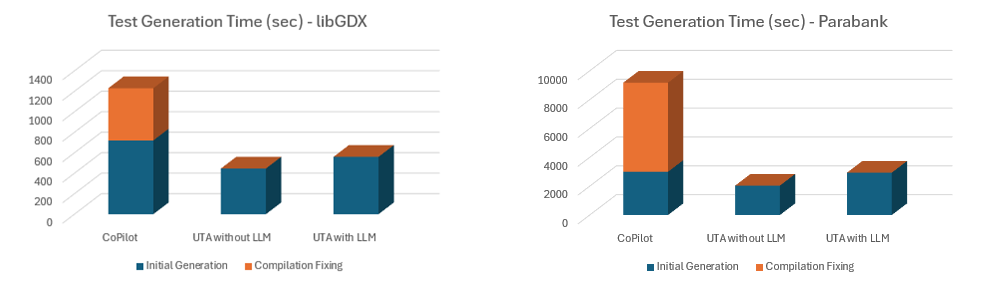
Because of the limitations of LLMs and actions available in Copilot, the number of tests generated per method under test can vary widely. This leads to inconsistencies and gaps in coverage. Parasoft Jtest UTA does not have these limitations and consistently generates tests regardless of class or method size.
Some factors, such as tests pass/fail ratio, can affect the final realized coverage rate. In this study, we didn’t spend the time to make 100% of tests pass; if we had, this may affect the final coverage numbers.


For generated tests to be useful in detecting bugs and regressions, they must be maintained in a passing state. When generated tests do not run properly, developers should fix these failures before committing them. This process takes extra time for each test, so a higher pass/fail ratio for a given set of generated tests is highly preferable.
In our study, we found that both tools were able to achieve a high success rate, in some cases over 90%. Parasoft Jtest UTA consistently had a higher success rate because it uses its own proprietary AI for a deep analysis of the code under test, resulting in more completely and properly configured tests. When LLM features are enabled, tests which fail after creation are improved further using LLM in a post-processing step. In practical terms, this translates to less time spent fixing failing tests before committing them to source control.
There are inherent limitations to be aware of when using an LLM-based unit testing tool. First, LLM is token-limited and priced. This means tools must carefully choose the context (source code, explanations, and other information) to send to the LLM. Because the LLM doesn’t have access to the full code base, it makes assumptions that need to be corrected later. This leads to compilation issues, failing tests, and hallucinations in generated code. Parasoft Jtest UTA has full access to the source code and uses its own proprietary AI-based analysis to drive test generation, so tests are more accurately built and configured even when LLM features are disabled.
Second, LLMs are limited in how much code they can generate per-interaction. With Copilot, you’re more likely to get complete passing tests for a small or simple class than for very large classes. You can get better results going method by method, but this takes a lot more time and manual effort. Parasoft Jtest UTA fully analyzes each method to be tested, regardless of the size of the codebase, resulting in more complete and consistent test suites with better coverage and without additional effort.
Third, LLMs cannot run generated tests after creation to improve them based on real execution results. Tests may have incorrect assertions based on assumptions that the LLM makes, and duplicate tests may be present. Parasoft Jtest UTA runs tests after creation to generate assertions based on real runtime data, optimize which tests to keep based on your chosen testing strategy, such as coverage or execution success optimization, and post-processes them to make further improvements.
It’s also worth noting that Parasoft Jtest UTA is capable of a lot more than the test generation workflow we’ve compared here. UTA can also:
Pure LLM-based tools like Copilot certainly have their strengths. For example, they are good at understanding the purpose of code in addition to the structure and provide good names and values in generated code. Also, because they have a large database of example code to draw from, they can understand a wide range of coding constructs and patterns and find the "best" solution when interacting with well-known libraries. New models are published regularly, keeping these tools up to date.
Parasoft Jtest UTA, even without LLM integration, is very good at generating full and minimized suite of tests that cover nearly all execution paths, even with large and complex codebases. UTA runs tests after creation to examine coverage, runtime data, and application behavior to generate real validations and enhance test stability.
When you enable LLM integration in Parasoft Jtest UTA, you get the best of both worlds. Tests are complete, stable, readable, and maintainable—and they are generated quickly and with minimal effort. After tests are generated, UTA provides both built-in and AI-enhanced actions for improving and updating tests as application code changes.

Ready to dive deeper?


