

We're an Embedded Award 2026 Tools nominee and would love your support! Vote for C/C++test CT >>
Jump to Section
Parasoft Blog


Part of what separates the best software development companies from the rest is the depth of software testing they carry out on their software products. But, how do they do this? Learn in this high-level overview.
Jump to Section
Development teams deliver high-quality, safe, secure, and reliable embedded software through rigorous testing, often driven by regulatory and standards compliance requirements.
The benefits of testing are straightforward: find and remove defects early, reduce development costs, improve performance, and mitigate legal risk. At Parasoft, we believe testing should be baked into every phase of the development process.
Historically, this was not the case. Testing was treated as a separate phase, performed late in the cycle by dedicated QA teams. When defects were found, fixes were costly, releases slipped, and stakeholder confidence eroded.
This overview provides a high-level, end-to-end look at software testing, connecting the pieces across the entire development life cycle.
Modern embedded software testing is no longer a final-phase gate. It’s a continuous discipline that’s woven through every stage of development. These six action points summarize how leading teams shift left, balance automation with insight, and deliver safe, compliant code without sacrificing speed.
Software testing is the process of analyzing a software system to identify differences between expected and actual behavior. Then evaluate whether it meets specified requirements. Through execution of the system, testing uncovers defects, missing functionality, and unintended behavior.
Effective testing ensures the software does what it’s supposed to do, preventing costly rework, delivery delays, and in safety-critical domains, potentially severe consequences.
Software testing methodologies are the strategies, processes, or environments used to test. The two most widely used SDLC methodologies are Agile and waterfall. Testing is very different for these two environments.
The waterfall model is a linear, sequential development methodology where requirements, design, implementation, testing, and deployment occur in distinct phases with minimal overlap.
For example, in the waterfall model, formal testing is conducted in the testing phase, which begins once the development phase is completed. This model works well for small, less complex projects, where requirements are clearly defined at the start. Because waterfall involves fewer processes and stakeholders to coordinate, projects can sometimes be completed faster than complex Agile initiatives.
However, the rigidity of the model creates significant risk. If requirements are unclear or change, it’s extremely difficult and expensive to go back and alter completed phases. Additionally, because bugs are typically not discovered until the dedicated testing phase, late in the life cycle, they’re significantly more expensive to fix than if they had been caught earlier. It’s extremely difficult to go back and make changes in completed phases.
The Agile model is an adaptive, incremental methodology that delivers software in small, iterative cycles. It emphasizes collaboration, customer feedback, and rapid response to change. Agile is best suited for complex projects where requirements are expected to evolve, rather than fixed-scope contracts.
In Agile, testing is continuous. Teams perform quality assurance during every iteration to ensure that each increment meets the definition of done (DoD).
By integrating testing throughout the development cycle, rather than leaving it until the end, teams reduce technical debt and identify defects early. This approach significantly lowers project risk because working software is delivered frequently, allowing stakeholders to provide feedback immediately rather than waiting for the final delivery date.
While Agile teams are self-organizing, success is often dependent on strong product ownership to make quick prioritization decisions and a skilled Agile coach or scrum master to remove impediments.
The iterative model is a software development approach that builds a system through repeated cycles known as iterations. Rather than delivering the entire product at once, developers:
Because working software is produced early and improved upon gradually, this model allows defects to be detected and fixed earlier in the process, reducing the cost of resolution. The iterative approach is particularly useful for large, complex projects where requirements aren’t fully understood at the outset because it allows for adaptation based on feedback without restarting the entire project.
Note that the iterative model differs from the Agile model, which also uses iterations but emphasizes customer collaboration and cross-functional teams. It also differs from DevOps, which focuses on integrating development and operations through automation and continuous delivery.
When taking a DevOps approach to testing, or continuous testing, there’s a collaboration with operations teams through the entire product life cycle. Through this approach, development teams don’t wait to perform testing until the after successfully building software or nearing its completion. Instead, they test the software continuously during the build process.
Continuous testing uses automated testing methods like static analysis, regression testing, and code coverage solutions as part of the CI/CD software development pipeline to provide immediate feedback during the build process on any business risks that might exist. This approach detects defects earlier when they are less expensive to fix, delivering high-quality code faster.
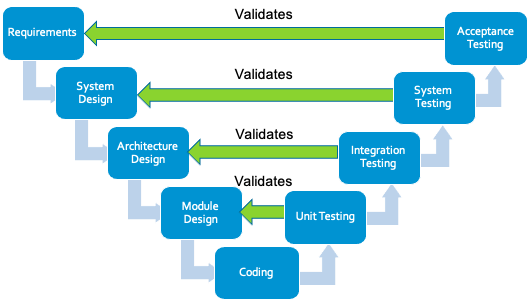
In embedded software development, testing strategies are typically divided into functional and nonfunctional methods.
Functional testing verifies that the system performs the specific behaviors defined in requirements, such as control algorithms, communication protocols, sensor handling, or state transitions. It answers the question: Does the system do what it is supposed to do?
Nonfunctional testing, by contrast, evaluates how well the system performs under real-world conditions, including timing constraints, memory usage, cybersecurity resilience, fault tolerance, and long-term stability. It answers the question: How well does the system operate under expected and unexpected conditions?
Both are essential in embedded systems, where failure may impact safety, reliability, or regulatory compliance.
Functional testing methods validate specific features and behaviors of the embedded application against defined requirements. These methods focus on control logic, input/output handling, communication interfaces, state management, and data processing within the system.
Nonfunctional testing methods assess the quality attributes and operational characteristics of embedded systems under various conditions, rather than validating specific features.
The most common types of software testing include:
Static analysis identifies defects in source code without executing the program. Teams typically perform it during or after coding, before unit testing. Tools automatically scan code to detect violations of coding standards and various lexical, syntactic, and semantic errors, including security vulnerabilities.
Parasoft’s static analysis tools extend this capability with result management features, allowing users to prioritize findings, suppress unwanted results, and assign issues to developers. These tools integrate with a wide range of IDEs and support C, C++, Java, C#, and VB.NET.
Unit testing isolates each part of the program and verifies that individual units, such as functions or methods, behave correctly according to requirements.
Developers typically perform unit testing during coding. With Parasoft, they can measure statement, branch, and MC/DC coverage to assess test completeness directly within their development environment.
However, unit testing cannot catch all defects. It does not verify interactions between units, nor does it expose threading issues, integration errors, or system-level failures.
Integration testing verifies that combined software modules work together correctly, focusing on interfaces, data exchange, and interaction between components.
Two common approaches are:
System testing validates the complete, integrated application against functional, quality, and business requirements. The system is treated as a black box, where testers verify behavior from the outside without examining internal implementation.
This phase is performed by the QA team in a production-like environment after all components have been integrated. Successful system testing indicates the application is ready for release and provides confidence in delivery timelines.
Acceptance testing validates that the application meets its business objectives, contractual obligations, and stakeholder expectations. It is typically the final testing phase performed before release.
The QA team executes pre-written scenarios and test cases derived from user requirements. The focus is not on cosmetic errors or minor bugs, those should have been resolved earlier, but on whether the system is fit for purpose and ready for deployment.
Acceptance testing also verifies compliance with legal and regulatory requirements and helps stakeholders assess production readiness and overall project success.
Security testing is the systematic process of identifying vulnerabilities, threats, and risks within a software system to:
In embedded and connected systems, security testing is especially critical because vulnerabilities can expose physical devices, safety functions, and entire networks to exploitation.
Key security testing approaches include:
Together, these practices ensure embedded systems remain resilient against evolving cybersecurity threats while protecting both data and device functionality.
Compliance testing verifies that software adheres to industry standards, regulatory requirements, legal mandates, and organizational policies specific to the domain in which the application operates.
In regulated industries, compliance testing is not optional. It’s a structured, auditable process that demonstrates conformity to defined safety, security, and quality standards.
Major compliance domains include:
Compliance testing typically involves requirements traceability, structured verification activities, coverage analysis, documented review processes, and audit-ready reporting. In safety-critical embedded environments, it provides the objective evidence required to demonstrate that software not only functions correctly but also satisfies regulatory expectations for safety, reliability, and risk mitigation
Software testing can be performed either manually or through automation. Both approaches have their own advantages and disadvantages, and the choice between them depends on various factors, such as the project’s complexity, available resources, and testing requirements.
Manual testing puts a human in the driver’s seat. Testers run through pre-defined cases or explore the software freely, using their intuition to sniff out unexpected problems. This is ideal for usability testing, where a human perspective is crucial to assess the user interface and overall experience.
On the other hand, automated testing involves using scripts or tools to execute test cases and validate expected outcomes. Automated testing comes in handy for regression testing best practices, where the same test cases need to be executed repeatedly after each code change or update.
Automation can save significant time and effort, especially for large and complex projects because it allows testers to run numerous test cases simultaneously and consistently.
The table below sums up the key differences between manual and automated software testing.
| Features | Manual Testing | Automated Testing |
|---|---|---|
| Test Coverage | Limited test coverage due to human constraints | Potential for high test coverage by executing numerous test cases simultaneously |
| Consistency | Prone to human errors and inconsistencies in test execution | Consistent test execution, ensuring repeatable results |
| Maintenance | Test cases and documentation need to be manually updated | Test scripts need to be updated, but can be automated to some extent |
| Initial Investment | Lower initial investment, primarily involving training testers | Higher initial investment for setting up the automation framework and writing scripts |
| Suitability for Regression Testing | Inefficient for extensive regression testing | Ideal for regression testing, allowing efficient re-execution of tests |
| Audit Trail and Reporting | Manual logging and reporting can be time-consuming | Automated logging and reporting capabilities, enabling better traceability |
AI in software testing is transforming embedded development by acting as a human amplifier, accelerating test authoring, selection, and remediation while engineers retain oversight and compliance accountability for standards like MISRA, AUTOSAR C++14, ISO 26262, and DO-178C. It enhances productivity, reduces manual effort, and frees teams for higher-value engineering decisions.
AI in embedded software testing for embedded environments with strict determinism, memory, and safety constraints helps teams:
AI outputs remain reviewable, validated, and traceable, aligned with certification objectives.
AI is already delivering measurable value in embedded toolchains through:
Organizations leveraging integrated AI/ML solutions are seeing increased productivity without compromising verification rigor.
AI outputs must always be reviewed, validated, and documented.
It’s important to distinguish between two very different uses of AI.
This is where AI is mature and productive. When used to assist static analysis, test generation, regression optimization, and traceability, AI operates in a controlled engineering environment with human oversight and documented outputs.
AI integrated directly into runtime embedded applications, such as perception systems or adaptive control, introduces additional challenges:
While AI in development environments is well-aligned with existing compliance frameworks, AI within safety-critical embedded systems still faces evolving regulatory guidance and verification challenges.
Testing should begin as early as possible in the software development life cycle. The earlier a defect is found, the cheaper and faster it is to fix. Every SDLC phase offers opportunities for testing, not just execution, but review, analysis, and validation.
Testing starts here by clarifying and negotiating requirements with stakeholders. This ensures the right system is built. Acceptance test cases are also defined at this stage, initially as text-based descriptions of what and how to test.
As the architecture takes shape, interfaces are defined. If modeling languages like SysML or UML are used, simulation can validate the design and uncover flaws early. As low-level requirements emerge, each is linked to corresponding unit test cases.
Developers apply coding standards and run static analysis to catch safety, security, and style defects at the cheapest point in the life cycle. They write and execute unit tests against low-level requirements.
As components are combined, integration, system, and acceptance tests are executed against requirements traced from earlier phases. A requirements traceability matrix reveals gaps and ensures every requirement is verified.
Additional test types, performance, stress, usability, API testing, and others, may be required depending on quality-of-service goals.
The principle remains: test continuously from requirements through release.
Software testing involves a range of roles, each contributing at different phases of the development lifecycle.
Responsible for identifying defects, mitigating risk, and preventing software issues. They study requirements, design and execute manual and automated test cases, report bugs, and verify fixes.
Involved across design, development, and testing. Developers apply coding standards, write unit tests, and often build and maintain test automation solutions. They possess deep knowledge of system implementation and requirements.
Oversee delivery timelines, quality, and successful completion of the development cycle. When issues arise, product managers prioritize fixes and balance technical debt against release goals.
Design and architect the system from high-level requirements. They define system-level test cases, ensure requirements traceability, and often validate designs through simulation or model execution such as SysML, UML.
Participate in beta testing to evaluate pre-release software. Their feedback confirms whether the product meets expectations and is on track for acceptance.
Depending on the organization, Scrum Masters, SDETs, DevOps engineers, and compliance specialists may also perform or enable testing activities.
Testing cannot prove the absence of all defects, but it can end when predefined completion criteria are met. Below are common indicators.
Testing often stops when timelines or budgets are exhausted. This may reflect completed test objectives or, in some cases, compromise quality due to resource constraints.
All planned test cases have been executed, critical tests have passed, and the overall pass rate meets the project’s defined threshold, for example, 100%. Remaining failures are limited to low-priority issues.
Every functional requirement has been tested and passes. Major workflows execute correctly across valid input variations.
Coverage measurement tools confirm that statement, branch, or MC/DC targets have been achieved, for example, 100%.
No high-priority defects remain open, and the rate of newly discovered bugs has fallen below a predetermined acceptable level.
Effective testing requires discipline, strategy, and continuous improvement. The following practices help teams build quality into every phase of development.
Integrate testing early and throughout the SDLC. Finding defects early reduces cost, rework, and schedule risk.
Align testing approach, techniques, tools, and resourcing with project goals and constraints. A clear strategy prevents ad-hoc, reactive testing.
Clear, unambiguous requirements enable effective test case design and ensure everyone interprets functionality the same way.
Use automation to accelerate regression testing and free humans for exploratory work. Lightweight frameworks like GoogleTest enable early, frequent unit testing. Paired with C/C++test CT, teams can enforce standards, measure coverage, and streamline execution directly in CI/CD, without sacrificing rigor.
Apply static analysis during implementation to catch coding standard violations, security flaws, and logic defects before dynamic testing begins.
Maintain bidirectional traceability between requirements, test cases, and code. This proves coverage and accelerates impact analysis during changes.
Track coding standard compliance, coverage depth, defect arrival rate, and resolution velocity. Use trends to refine processes, not as vanity metrics.
Developers, testers, and product owners should share context early. Regular communication reduces misunderstandings and keeps testing aligned with business value.
provides automated testing solutions that help teams deliver safe, secure, and reliable software at scale, across automobiles, aircraft, medical devices, railways, and industrial automation domains.
Its unified toolset accelerates testing by enabling teams to shift left without sacrificing traceability, coverage, compliance documentation, or audit readiness. From unit testing to system validation, Parasoft automates repetitive tasks and maintains the artifact traceability required for safety-critical certification.
Maximize quality, compliance, safety, and security with Parasoft intelligent software test automation.


